Blog

How Many Wi-Fi Access Points Does a Larger Home or Property Need?

There's no reliable formula that turns square footage into an access point count. Two properties of identical size can call for very different Wi-Fi designs, because what actually determines the answer is what the signal has to pass through, how the space is laid out, and how many devices are competing for it at once — not how many square feet are on the plan. Concrete and masonry block a Wi-Fi signal far more than a stud-and-drywall wall does. A property with a detached garage, guest house, or pool house needs its own coverage plan, not just a stronger router in the main house. And a household streaming video on several devices, running security cameras, and controlling smart-home systems needs more consistent performance than one that mostly browses and checks email. The right number of access points is whatever gives every part of the property reliable coverage without wasting equipment or creating interference. That number comes from a plan, not a guess.

Why Square Footage Alone Doesn't Give the Answer

Two homes of the same size can need very different Wi-Fi designs. A single-story, open-concept home with mostly interior stud walls might get solid, reliable coverage with relatively little equipment; a two-story home of the same size, built with block or stucco-over-masonry exterior walls, might need more — not because it's bigger, but because the signal has to work harder to get through. Layout matters too: a long, narrow floor plan behaves differently than a compact one, and a finished basement or detached casita adds a coverage zone square footage doesn't account for. Square footage tells you how much space there is — not what's in the way, how it's used, or how many devices need to stay connected, which is what actually determines the count.

What an Access Point Actually Does

An access point is the equipment that broadcasts Wi-Fi into a room — separate from, though often confused with, a few other pieces of gear. A modem connects the property to the internet provider; a router directs traffic between the internal network and the internet, and most consumer all-in-one devices also include a built-in access point. A Wi-Fi extender rebroadcasts an existing signal to reach farther, usually by giving up part of its own bandwidth, and it's only as good as the signal it started with. A mesh node is a more capable extender, built to coordinate with identical nodes as a system. A dedicated access point is different: a purpose-built radio, usually ceiling- or wall-mounted, ideally with its own wired connection, and centrally managed alongside every other access point on the property.

The Factors That Determine Access Point Count

The number of access points a property needs comes from several factors interacting together, not any single one of them:

FactorHow It Affects Access Point Planning
Floor planOpen layouts need fewer APs per square foot than segmented ones
ConstructionConcrete, masonry, and metal block signal more than drywall and wood framing
FloorsEach additional floor is typically its own coverage zone
Device countMore connected devices raise capacity needs independent of square footage
Outdoor areasUsually need dedicated outdoor APs rather than indoor overflow
Detached structuresEach one is a separate coverage — and often backbone — decision
Wired backhaulAPs with their own wired connection perform more predictably than those relying on wireless relay
Performance expectationsStreaming, video calls, and AV/control systems raise the bar beyond basic browsing

No single factor determines the count on its own — a professional design looks at all of them together for the specific property.
Continue reading

What to Expect From a Professional Starlink Installation in Yuma, AZ

A professional Starlink installation is more than plugging in the dish. It usually covers five things: finding a location with a clear view of the sky, mounting the dish permanently, routing the cable and protecting where it enters the building, connecting Starlink to the right router, and making sure Wi-Fi actually reaches the places you use. Here is what each step involves, and what to ask before you hire someone.

Is buying Starlink the same as hiring an installer?

No. Starlink internet service and a professional installation are separate purchases. You get your Starlink kit directly from Starlink or from a local retailer where available, and you keep your own Starlink subscription, so the account and billing stay between you and Starlink. An installer is hired separately to mount, route, connect and integrate the equipment you own. With WOW Electronics, the customer also provides the compatible Starlink mount, and WOW can check the proposed location and hardware compatibility before you order it.

How do you choose where to put a Starlink dish?

Starlink needs a clear view of the sky so it can stay connected as satellites move overhead. Starlink notes that objects such as a tree branch, a pole or a roof can interrupt that connection. The best location is the one with the clearest sky view that can also be mounted securely and reached with the cable — which is not always the highest point on the building.

How do you check a location for obstructions?

The Starlink app includes a "Check for Obstructions" tool. You stand at the proposed location, hold your phone as close as possible to the height and position the dish will occupy, and scan the sky with the camera. The app estimates how obstructed that spot is, and you can repeat the scan at several locations. Starlink recommends doing this before permanently installing the dish, and, in heavily obstructed areas, before ordering.

Does Starlink need to be permanently mounted?

Not necessarily, but Starlink recommends permanent installation for the best performance, cable protection and long-term reliability. A temporary setup on the ground or a stand can shift, get bumped, or leave the cable exposed. A permanent mount keeps the dish where its sky view was checked and keeps the cable protected.

Continue reading

Wireless Bridge or Fiber Between Buildings: Which Is Better?

When two buildings on the same property need to share one network, there are really only two practical ways to connect them: a wireless bridge or a physical cable, usually fiber. A wireless bridge — a dedicated point-to-point radio link, not the same as ordinary Wi-Fi — is often the right answer when trenching or running cable between buildings isn't practical, whether because of cost, distance, landscaping, or a rented property. Fiber is usually the stronger long-term backbone when a physical path is available, because it's a dedicated, electrically isolated connection that isn't affected by weather, interference, or line of sight the way a wireless link is. Neither option is automatically correct. The right choice depends on the property, what the connection needs to carry, and how permanent the setup is meant to be.

What Is a Wireless Bridge?

A wireless bridge is a dedicated, point-to-point wireless link between two buildings — not the same thing as extending ordinary Wi-Fi coverage outdoors. It uses a matched pair of radios, one mounted at each building, aimed directly at each other (this is what "line of sight" means: a mostly clear, unobstructed path between the two) rather than broadcasting in every direction the way a typical access point does. Because the radios are aimed at one another instead of serving many devices spread across an open area, a wireless bridge can move considerably more data than an ordinary Wi-Fi connection, and it behaves, from the network's point of view, much like a single long cable between the two buildings' switches.

What Does Running Fiber Between Buildings Mean?

Running fiber means installing a physical fiber-optic cable as the permanent backbone between two buildings — the same kind of structured, low-voltage cabling work as the rest of a property's network infrastructure — typically inside conduit (a protective pipe the cable runs through) that's either buried directly in the ground or routed along an existing path such as a utility trench. At each end, the fiber connects into a managed switch through a small fiber transceiver — a media converter that turns the light signal back into a normal network connection. None of this requires the property owner to understand optics; from a household or business point of view, a properly installed fiber run functions like a very long, very reliable Ethernet cable.

When a Wireless Bridge Makes Sense

A wireless bridge is often the practical choice when:

  • Trenching or running conduit between buildings isn't possible or would be prohibitively disruptive — across a driveway, mature landscaping, or hardscape that would need to be torn up and repaired.
  • The property is rented or leased, and permanent underground work isn't an option.
  • A road, drainage feature, or other obstacle sits between the buildings, making a buried cable path impractical.
  • The connection is temporary — a construction trailer, a seasonal structure, or a setup that isn't meant to be permanent.
  • The buildings have a clear, unobstructed line of sight and aren't too far apart for the equipment being used.
  • The bandwidth the remote building actually needs is modest, and a well-installed bridge can comfortably carry it.

When Fiber Is the Better Long-Term Choice

Fiber tends to be the stronger choice when:

Continue reading

What Should You Ask a Structured Cabling Contractor Before You Hire Them?

If you've collected more than one quote for a structured cabling project, you've probably noticed the totals don't line up — and the proposals don't always make it obvious why. One document might be two pages long. Another might run six. Neither necessarily tells you what you're actually getting.

That's not because contractors are trying to confuse you. Structured cabling proposals cover a lot of ground — cable type, quantity, hardware, pathways, testing, documentation — and a proposal that leaves any of that vague isn't automatically a bad one. But it does mean you can't evaluate it the same way you'd evaluate two quotes for the same commodity item. Before you compare price, it helps to know what questions separate a well-defined scope from one that's still full of assumptions.

This isn't a list of tricks contractors use to take advantage of buyers. Most low-voltage contractors are straightforward to work with, and a quote that looks thin is often just a quote that hasn't been asked to get specific yet. The goal here is to help you ask the right questions so whichever company you choose, you and they are working from the same understanding of the job.

Start With Who's Actually Licensed to Do the Work

In Arizona, contracting work is regulated by the Arizona Registrar of Contractors (ROC), which issues licenses by classification. Low-voltage and communications systems work — the category structured cabling generally falls under — is one of the specialty classifications the ROC defines separately from general building or electrical contracting, currently including commercial (C-67), residential (R-67), and dual (CR-67) Low Voltage Communication Systems classifications.

That doesn't mean every structured cabling project automatically requires that exact classification, or only that classification; scope, project type, and what else is bundled into the job can affect that. What it does mean is that it's a fair and simple question to ask: which license is this project being contracted under, and who holds it?

Continue reading

What Should You Prewire Before the Drywall Goes Up in a Commercial Building?

Once walls and ceilings are finished, adding low-voltage cabling usually turns into a retrofit problem instead of a straightforward rough-in decision. A commercial building's low-voltage infrastructure — data and network cabling, wired backhaul for wireless access points, cabling and pathways for security cameras and access control, connections for conference-room AV and displays, a planned equipment location, and enough spare conduit and pathway capacity for what comes next — is considerably easier to plan and install while walls and ceilings are still open than afterward. None of it needs to be finalized in exact detail before construction starts, but it needs to be part of the conversation early, because the options narrow considerably once framing, ceilings, and finishes are in place.

This is written for the people actually making that call: general contractors, builders, business owners, and facility or property managers planning new construction, a tenant improvement, a remodel, or an expansion — office, retail, warehouse, agricultural or packing facility, logistics space, or anything in between.

Why Early Planning Matters More Than a Fixed Sequence

Low-voltage planning works best when it starts during building design, not once framing is already up. Telecommunications and low-voltage pathways — device locations, cable routes, equipment-room space, and conduit — need to be coordinated with the architect, electrical, mechanical, and other trades before walls and ceilings close, so conflicts get resolved on paper instead of discovered in the field. Telecom design guidance that follows standard industry practice makes this point directly: infrastructure planning belongs in the preliminary design phase, with the goal of coordinating between disciplines during design rather than making adjustments in the field during construction.

The actual construction sequence varies by project — some low-voltage rough-in happens alongside electrical rough-in, some follows it, and the order depends on the general contractor's schedule and how the trades are coordinated on that specific job. There's no single universal sequence that applies to every project. What doesn't vary is the underlying constraint: once walls, ceilings, and door assemblies are finished, running a new cable or adding a device location becomes a retrofit rather than a rough-in task.

The list below isn't a claim that every project needs every item on it, either. A small retail buildout has a different real scope than a multi-suite office or a packing facility with a detached equipment building. The point of going through it isn't to check every box — it's to make each decision on purpose, while it's still straightforward to change.

Continue reading

Why Your Network Should Be Planned Before Your AV & Control System

Most people think of their network as the thing that gets them online, and the AV system, control system, cameras, and speakers as separate equipment layered on top of it. That's no longer accurate. On a modern system, the network is part of the AV system. It's how your control processor talks to your amplifiers, how your Sonos speakers stay in sync, how your video matrix moves a signal from one room to another, and how your phone or a wall panel tells any of it what to do.

That distinction matters because of when problems show up. A network that's "fine for browsing and streaming" can still be the reason a well-designed AV system feels unreliable: lighting that responds late, audio that drops out of sync, a control app that occasionally just stops working. The fix usually isn't more AV equipment. It's going back and fixing the network the AV system was quietly depending on the whole time. Planning the network alongside, or before, the AV and control design avoids that entirely.

Today's AV System Depends on the Network

A home theater or conference room's AV gear used to run mostly on its own dedicated wiring: speaker wire to the amp, HDMI to the display, done. A lot of simpler systems still work exactly like that, and there's nothing wrong with a self-contained setup when that's genuinely what a space needs.

But once a system uses whole-home audio, centralized control (a Crestron or similar processor telling multiple rooms what to do), AV-over-IP for video distribution, or any device that streams, syncs, or gets controlled remotely, the network stops being a bystander. It's carrying control commands, streaming audio and video, device-discovery traffic (so your control system can find the equipment it's supposed to talk to), and often a wireless interface on top of all of it. None of that is universal; a single-room system with local controls may need almost nothing from the network. But the more integrated and multi-room a system gets, the more it functions, in practice, as a network application. Designing the AV system without designing the network at the same time is designing half a system.

Existing Wiring Is Not Automatically Good Enough

One of the most common assumptions we run into is that if there's already cable in the walls, it's ready to go. Sometimes it is. Sometimes it isn't, and the only way to know is to test it rather than assume.

Continue reading

How to Plan Network Cabling for an Office Move or Expansion

Moving into a new office or expanding into additional space is a big enough project on its own — new lease terms, furniture, IT equipment, moving logistics. Network cabling often gets treated as something that will “just get figured out” once the keys are in hand. That’s usually the point where problems start: a move-in date arrives and the internet isn’t live, the existing cabling in the new space turns out to be unusable, or a new conference room has no way to get a display or camera connected.

None of that is inevitable. Network cabling for a move or expansion is a planning problem more than a technical one, and most of the issues that show up on move day trace back to a handful of decisions that needed to happen weeks earlier. This article walks through what those decisions are, in the order they typically come up — from the first walkthrough of the new space through move-day testing — so you know what to raise, and when, whether you’re moving into a new suite, taking over additional square footage, or expanding into the space next door while staying open in your current one.

Start the Cabling Conversation Before You Sign the Lease (or the Addendum)

The earlier a cabling provider is involved, the more options are still on the table. Once a lease is signed and a move-in date is set, some of the best opportunities — negotiating landlord cooperation for access, timing the work around when the space is empty, coordinating with a general contractor who’s already scheduled — start to close.

It doesn’t have to be a formal engagement at this stage. A short walkthrough of the space, even before the lease is final, gives a cabling provider a chance to flag issues that are easy to miss on a real-estate tour: where the existing telecom/data room is (or isn’t), whether the ceiling type allows for easy cable pathways, whether there’s evidence of old, abandoned cabling that will need to be dealt with, and roughly how much work the space will need before it’s functional. That early read is what turns “we’ll figure out the network once we move in” into an actual plan with a timeline attached to it.

Who’s Typically Involved in a Move or Expansion Project

Network cabling for a move or expansion usually touches more people than just whoever is doing the physical installation. Getting them talking to each other early heads off a lot of the coordination problems that otherwise surface midway through the project:

Continue reading

How Many Data Drops Does an Office Actually Need?

If you've ever asked a low-voltage contractor for "a few data drops" and gotten a longer list of questions back, you're not alone. It's a reasonable question with a genuinely unsatisfying honest answer: it depends on what's actually going to plug in, and where. This is a practical planning guide to figuring that out before the walls close or the office opens — not a fixed number to memorize.

"Data Drop" Doesn't Always Mean the Same Thing

Before getting into counts, it's worth being precise about what's actually being counted, because "drop," "jack," "port," and "cable" get used interchangeably in everyday conversation but don't all mean the same thing.

A horizontal cable run is the physical cable pulled from the equipment room to a location. A telecommunications outlet — what most people picture when they say "jack" — is the connector at the work-area end, usually mounted in a wall plate. A port is a general connection point — for example, a switch port on active network equipment, or a patch-panel port in the telecommunications room. And a patch-panel port specifically is where a horizontal run lands at the equipment-room end, before it gets connected to a switch.

There's also a variation worth knowing about: a direct-connect run (formally called an MPTL, or Modular Plug Terminated Link) skips the wall outlet entirely and terminates the cable straight into a plug that connects directly to the device. MPTL was formally added to the TIA cabling framework in the prior 568.2-D edition and remains a recognized direct-connect approach under the current 568.2-E framework. It's common for devices that don't move — access points and mounted security cameras are the typical examples. For the fuller cabling, PoE, and switching picture behind a mounted security camera system specifically, see our guide to commercial security camera cabling and network infrastructure.

Why this matters practically: when someone says "I need one data drop," that could mean one wall plate with one jack, one wall plate with two jacks (very common at a single work area), or something else entirely. Getting specific about which one you mean — one cable, one jack, one location with multiple jacks — up front avoids scope confusion later in a proposal.

Continue reading

Cat6 vs. Cat6A vs. Fiber: What Should Your Business Install?

If you're planning a new commercial build-out, a tenant improvement, or a network upgrade in Yuma, one of the first infrastructure questions you'll run into is which cable to actually put in the walls: Cat6, Cat6A, or fiber. Cable and equipment suppliers will each tell you their product is the obvious choice. The honest answer is that there isn't a single right answer for every building — there's a right answer for your building, based on distances, expected bandwidth, power requirements, budget, and how long you expect the infrastructure to last before the next remodel.

This isn't a "what is Cat6?" explainer. It's meant to help you make an informed decision before you request or review a structured-cabling proposal — including understanding when the right answer isn't one cable type at all, but a mix.

What Cat6 Is Good At

Category 6 cable comfortably handles standard Gigabit Ethernet (10/100/1000BASE-T) to the full 100-meter structured-cabling channel — the everyday connection for computers, printers, VoIP phones, point-of-sale terminals, many IP cameras, and most other standard Ethernet devices. For a large share of commercial work areas, that's still plenty of bandwidth.

Cat6 can also carry 10-gigabit Ethernet (10GBASE-T), but the honest picture is more nuanced than a single distance figure. Per TIA's TSB-155 guidance, a Cat6 channel up to about 37 meters should reliably support 10GBASE-T. Between roughly 37 and 55 meters, whether it works depends on the alien-crosstalk environment — how the cable is bundled and routed relative to other cables nearby. Beyond about 55 meters, Cat6 may need active mitigation and shouldn't be assumed to support 10GBASE-T at all. In practice, the only way to know for certain whether an existing Cat6 link will reliably run 10GBASE-T is to field-qualify it — distance alone isn't a reliable predictor. Cabling-test manufacturer Fluke Networks has documented cases of 60-meter links performing fine while some 30-meter links did not, which underscores how condition-dependent this really is.

That's a meaningfully different scenario than specifying new cabling designed from the outset to run 10-gigabit Ethernet across a full, standards-compliant 100-meter channel — which is exactly the gap Category 6A was built to close.

Continue reading

How Many Wi-Fi Access Points Does an Office Need?

If you’re planning Wi-Fi for a business space — a new office, an expansion, a tenant build-out, or fixing dead zones in the space you already have — “how many access points do we need” is usually the first question that comes up. There’s no reliable shortcut from square footage to an access point count; anyone offering one without having looked at your space is guessing.

This isn’t a home Wi-Fi question. If you’re planning Wi-Fi for a home or larger residential property rather than a business, our guide to residential access point planning covers that instead. Office Wi-Fi has to support concurrent video calls, cloud applications, guest and BYOD traffic, and a full workday of simultaneous use — reliability expectations a home network usually doesn’t have to meet. This article covers what actually drives access point count in a commercial space, why more access points isn’t automatically better, and how AP planning connects to the wired network behind it.

Coverage and Capacity Are Two Different Problems

It’s tempting to think of Wi-Fi planning as a single question — “does the signal reach?” — but that’s only half of it. Coverage is whether a usable signal physically reaches every part of the space. Capacity is whether the access points serving that space can actually support the number of active clients and their applications at an acceptable performance level — not just whether the signal is present, but whether it holds up under real, simultaneous use.

A single access point can have excellent signal strength throughout an open floor and still perform poorly during a busy stretch of the day if too many people are on video calls at once and the access point doesn’t have the capacity to serve that many high-bandwidth connections well. Conversely, a space can have plenty of access points for capacity and still have dead zones because of how the signal is blocked by walls, floors, or interior construction. Commercial Wi-Fi planning has to solve both problems together, which is the main reason a formula based on square footage alone doesn’t hold up — square footage speaks to coverage, but says nothing about how many people or devices will actually be using the network.

What Actually Drives Access Point Count in an Office

There’s no single number that applies to every office, because the factors that matter vary from one space to the next. In general terms, these are the factors that most affect how many access points a commercial space needs:

Continue reading

How Long Does a Commercial Structured Cabling Installation Take?

For a commercial wiring or structured cabling project, the schedule depends on more than the number of drops. Some straightforward projects may be completed in days, while larger, occupied, or access-restricted ones can extend across several weeks. Where a given project lands depends on the scope of work, the building’s physical conditions, how much access the crew gets, how well the project is coordinated with other trades, and what’s required to close it out.

That’s not a dodge — it’s the same thing a good general contractor or electrician would tell you about their own trade. What a structured cabling contractor can do is give you a project-specific schedule once they understand your scope and have seen (or been walked through) the site. This article explains what goes into that schedule so you know what to expect and what to ask.

Labor Time vs. Total Project Duration

It helps to separate two different numbers:

Labor time is how many technician-hours or technician-days it actually takes to pull cable, terminate it, build out racks, and test everything. This is what a contractor is estimating when they staff a job.

Total project duration — sometimes called calendar time — is how many days or weeks pass from the first site visit to final sign-off. It includes labor time, but also material lead times, design/approval steps, coordination with other trades, access windows, and any time the project sits waiting on a decision, a delivery, or another crew to finish its part.

Continue reading

What Determines the Cost of a Commercial Structured Cabling Project?

If you're budgeting for commercial structured cabling, the first question is usually some version of "what does it cost per drop?" It's a fair question. The honest answer is that no single per-drop number means much until you know what each drop includes and the conditions it will be installed under. Two projects with the same number of drops can require very different amounts of labor, material and coordination. The price is built from the building, the pathways, the hardware at each end, the testing and documentation required, and the conditions the work happens under.

This guide explains how a commercial cabling estimate comes together: the variables that move it, and the information that helps a contractor price your project accurately. It won't give you a national average. Those figures vary widely from source to source and rarely describe your building.

How a Commercial Cabling Estimate Is Actually Built

A cabling estimate isn't one number multiplied by a drop count. It's closer to a set of layers:

  • Quantity: how many cable runs, to how many locations, of which types.
  • Route and conditions: how far each run travels, through what kind of space, and how hard that space is to work in.
  • Scope boundaries: where the cabling starts and ends, and what hardware, pathway or equipment is included at each end.
  • Deliverables: the testing, labeling and documentation handed over at the end.
  • Project factors: schedule, site rules, access equipment, coordination with other trades, and setup and closeout work that exists whatever the run count.

Each layer changes the labor and materials an estimator has to carry. When two estimates come in far apart, differences in scope and assumptions are the first things to compare. Even with matching scope, contractors may legitimately differ in how they price labor, productivity, overhead, procurement, project management and risk.

The table below summarizes the main cost drivers and how each one moves an estimate.

Continue reading

What Cabling and Network Infrastructure Does a Commercial Security Camera System Need?

Choosing cameras is usually where a commercial security camera project starts — resolution, field of view, low-light performance, brand. But cameras are only one half of a working surveillance system. The other half is the network behind them: the cabling that reaches each camera, the power that runs to it, the switch it plugs into, the uplink that carries its video, and the recorder or platform that stores and manages it. Skipping that planning doesn't mean it goes away — it just gets discovered later, usually as a change order or a camera that never quite performs the way it was supposed to.

This article is about that infrastructure: what's behind the camera, not the camera itself. For camera features, monitoring, access control, and the rest of a security system, see our commercial security page. For the cabling and network side of a project, WOW Electronics designs and installs structured cabling and business network infrastructure for commercial clients across the Yuma area, and that includes the network a camera system runs on.

The Basic Path Behind an IP Camera System

Many current commercial surveillance systems use IP cameras that communicate over network infrastructure, rather than a separate coaxial system. In general terms, the path a camera's video takes looks something like this: the camera connects through horizontal network cabling to a switch (often a Power over Ethernet, or PoE, switch, or a recorder with built-in PoE ports); that switch connects — directly or through an uplink/backbone — to wherever the video is recorded and managed, whether that's a network video recorder (NVR), a video management system (VMS) server, a cloud-connected gateway, or some combination of these.

That's a useful mental model, but it isn't the only way a camera system can be built — the right topology depends on the site, the camera count, the building layout, and the recording platform chosen (more on those options below), so no single diagram fits every project. What matters for planning purposes is that every link in that chain — cable, power, switch, uplink, recording platform — has to be sized and located correctly for the cameras it's supporting.

Cabling to Each Camera Location

A conventional IP-camera design commonly runs an individual structured-cabling connection to each camera location, similar to how a data drop is planned for a workstation or an access point. That's not a universal technical requirement for every possible camera or system architecture, but it's the starting assumption worth planning around for a typical commercial multi-camera install.

Continue reading

What Testing Should You Expect After a Structured Cabling Job?

"The cabling's been tested" is one of the most reassuring sentences a business owner hears at the end of a structured cabling project — and one of the least specific. Tested how? Tested for what? A quick continuity check with a basic tester and a full standards-based certification report for every link in the building can both get described as "tested," and they mean genuinely different things for what you're actually getting.

This isn't a scare piece about demanding the most expensive testing available for every project. It's meant to help you understand the real differences between the levels of cabling testing that exist, so you can ask a specific, informed question on your next proposal — or your next project closeout — instead of accepting "yes, it's tested" as a complete answer.

Continuity, Application Support, and Standards Compliance Are Three Different Questions

There are three genuinely different things "tested" can mean, and they build on each other:

"The cable passed a continuity test" tells you the wiring is connected correctly — nothing more. "The cable supports the intended Ethernet application" tells you it can actually carry the speed you need. "The installed link was certified to the applicable cabling standard" tells you it was measured against, and complies with, the published industry standard for its category. Each one answers a different question, and none of them can be assumed from the others. A cable can pass a continuity test and still fail to reliably run Gigabit Ethernet. A cable can qualify for the application you're running today and still not meet the formal certification a manufacturer warranty requires.

Verification: Is the Cabling Connected Correctly?

Verification is the baseline. A verification tool checks continuity and performs a wiremap — confirming that the conductors in a Cat6 or Cat6A cable land on the correct pins at both ends, catching problems like opens, shorts, and miswires such as reversed or crossed pairs. Depending on the specific instrument, a verification tool may also catch more subtle wiring faults such as split pairs, support toning or tracing (so a technician can identify one specific cable out of a bundle, or trace a run behind a finished wall), and provide a basic length reading. Not every basic tester supports every one of these checks — capability varies by instrument.

Continue reading

MDF vs. IDF: How Should a Business Plan Its Network Equipment Rooms?

If you've spent any time around a commercial building project, you've probably heard someone mention "the MDF" or "an IDF" and nodded along without a precise picture of what's actually meant. That's normal — these are industry-common terms, not exactly household ones, and different people on a project (the electrician, the IT consultant, the low-voltage contractor) sometimes use them a little differently. This is a practical guide to what these spaces actually are, when a building needs more than one of them, and what's worth thinking about before they get built or assigned.

MDF and IDF: What the Terms Actually Mean

MDF stands for Main Distribution Frame — an industry term commonly used for a building's primary telecommunications/network distribution point. It's typically the central location from which the rest of the building's network is distributed. Depending on the building and how the service provider's design works, the carrier entrance or demarcation point may be located in that same space, or in a separate entrance facility.

IDF stands for Intermediate Distribution Frame — an additional distribution location that extends the network out to another floor, wing, or area of a building that's too far from the MDF, or too large, to serve efficiently from one central point alone.

Those two terms are what most people in the field actually say, and this article uses them for that reason. It's worth knowing, though, that current structured-cabling standards (the ANSI/TIA-569 series, which covers telecommunications pathways and spaces) generally describe these spaces with more formal terms: Equipment Room (ER), Telecommunications Room (TR), and Entrance Facility (EF) for the point where outside service enters. MDF and IDF are widely used industry terms rather than the standards' own defined room names — but in many commercial projects, an MDF roughly corresponds to a building's main Equipment Room/distribution role, and an IDF often roughly corresponds to a distributed Telecommunications Room role. Those are practical, general mappings a buyer can use to translate between the language a contractor uses on-site and the language a spec or standard might use — not strict synonym definitions. This article keeps using MDF/IDF because that's the language most buyers actually search for and hear on a job site, while noting the more formal terms where it's useful.

Does This Building Need More Than One?

This is the actual question worth answering, and there isn't a single number that answers it for every building. Whether a business needs just one central room (an MDF) or a central room plus one or more additional rooms (IDFs) depends on a combination of factors specific to that building:

Continue reading

Your Network Powers Smart Technology That Works

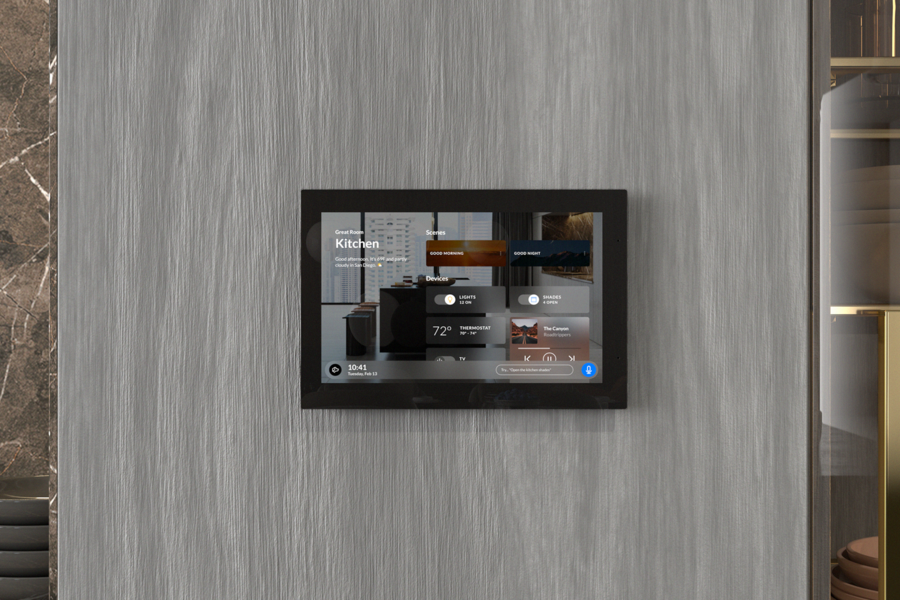
Wall-mounted smart home control panel in a modern kitchen, displaying lighting, thermostat, shades, and music controls.

Advanced AI Systems Fail With Poor Connectivity 

Homes and businesses across Yuma are adopting artificial intelligence faster than ever. Property owners spend thousands on AI-powered surveillance, voice-controlled automation, and climate control, only to discover their advanced technology delivers frustration instead of convenience.

The problem isn't the technology. It's the network powering it underneath.

Your network acts as the central nervous system for every connected device in your property. AI systems processing facial recognition data, coordinating with voice assistants, or managing complex automation need consistent, high-speed connectivity. A weak network creates bottlenecks and daily headaches.

When the network fails, smart lighting responds seconds after you've left the room, security cameras miss critical moments, and voice assistants need three commands to dim the lights.